
|
Additional Support Computer Systems Game Consoles |
Due to Pauls death this section of the website now has no current tech support we have left this area here as an online archive. We would like to continue support for this product but it will not be as extensive as before.
This section is aimed at helping online gamers configure their broadband router and Playstation 3 (PS3) for online play and connecting to the Playstation Network.
There are two stages to configuring your Playstation 3 for online play: Configuring the firewall/port forwarding on your broadband router and setting the Network preferences on the PS3 itself.
If you require any additional help or more detailed instructions on setting up and/or configuring your new Playstation 3, then please feel free to contact us for more help.
PLEASE NOTE that we can only provide telephone support to our own Orpheus broadband subscribers.
How would you like to setup your Playstation 3?
This section has now moved to our firewall page so that we can expand and clarify our notes on configuring your router firewall.
As you may have spotted in our firewall instructions, I've included a couple of other ports in the standard Playstation Network access, as ports 3659 and 3660 seem to be needed for joining MotorStorm online games.
Sony's online manual doesn't make it entirely clear which ports are required for certain games, which can cause problems connecting, depending upon how secure your firewall is. The following table contains some of the ports required open by some popular games.
| Game | Ports required open / Notes |
|---|---|
| Call of Duty 3 | Source & Destination port 3074 allow outbound + inbound on UDP and TCP. This game seems a bit tricky to configure because quite often it refuses connection to a game, with an error such as "Could not connect to hosting player" or "Could not connect to all players", but it would appear that could be down to individual firewall settings of the other players. |
| MotorStorm | Source & Destination UDP ports 3659 - 3660 allow outbound + inbound N.B.MotorStorm can suffer from 'lag' in online games if the firewall settings are not quite correct. |
| Resistance: Fall of Man | Source UDP ports 6505 - 6999 allow outbound |
| Warhawk | It seems that Warhawk needs quite a few ports to be opened, to prevent the "this game is full" error messages preventing you from joining online games. You require UDP ports 6000 - 6499 to be open outgoing (incoming can be blocked) as well as outgoing UDP port 10029. I've also disocovered that TCP port 53346 should be open for outgoing connections. |
N.B. The information on Paul's personal web site at www.vigay.com/ps3/ is slightly more up to date than the table above.
An example showing online gaming ports configured is shown in fig.3
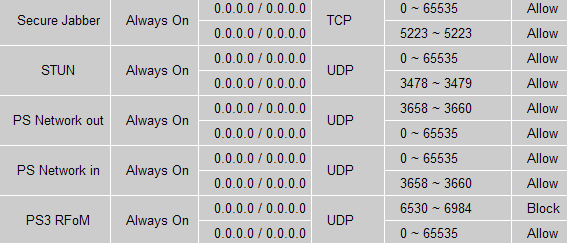
Once you have configured the various firewall settings on your router, don't forget to Save your router choices by clicking on the relevant save button to ensure that all your changes are programmed permanently into the router.
 |

|
  |